



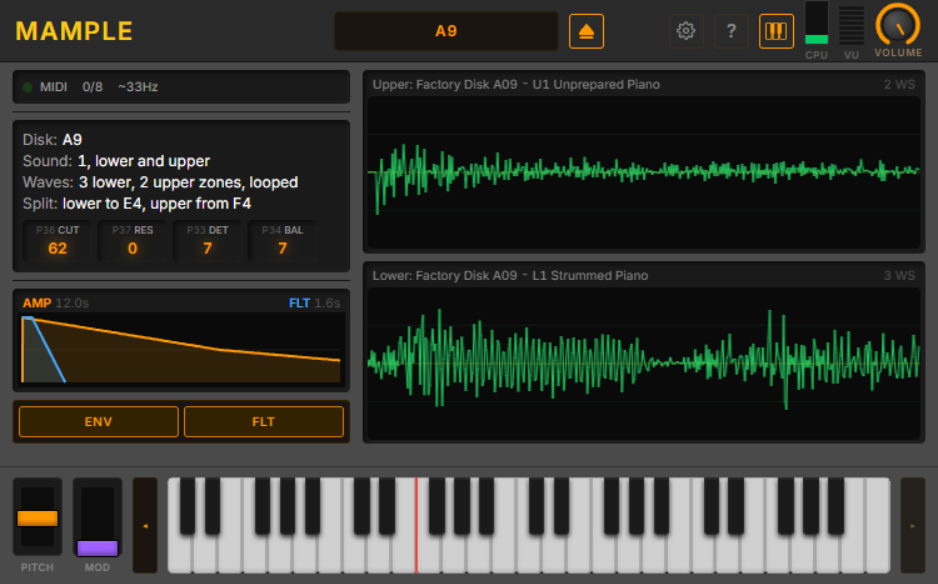
You don't need a 1MHz 6809 CPU to make something sound like a Mirage. You need the 32-oscillator ES5503 wavetable engine. You need the CEM3328 4-pole filter. You need the analog chain that gave every Mirage patch that unmistakable grit.
Mample gives you exactly that — the oscillator and analog chain, faithfully modeled, with none of the overhead of booting a 40-year-old operating system just to play a note.
Load your original Mirage sample disks. Mample reads the patches directly, feeds them through the real signal chain, and plays them back the way they were meant to sound. Authentic. Immediate. No OS required. No cheat sheet required. No therapy required.
It's the Mirage sound without the Mirage experience. For people who want the tone, not the trauma.
If you want the complete Mirage experience — interface quirks, firmware boot, existential parameter navigation and all — DSKlusion is waiting for you.
Disks not included. Obviously.
Changelog
v0.5.92 — September 16, 2026
- Running a second window no longer blanks or crops the first's UI. Each open editor now keeps its own private WebView data folder instead of one shared per product, so the standalone and the plugin — or two plugin instances in one project — can be open together on Windows without one coming up white or with its bottom cut off. Folders left behind by a closed instance are cleaned up automatically.
v0.5.91 — September 16, 2026
- Built on JUCE 9.0.2, up from 9.0.1.
v0.5.87 — September 13, 2026
- Help text in Settings now has one typeface and colour in both products. Several of DSKlusion's rows (Boot ROM, OS disk images, sound disks, disk writes, audio and logging) had fallen back to a typewriter face.
- Folder and file rows share one design, and their Browse buttons match the other buttons in Settings.
- An empty folder or file row now reads "(default)" everywhere. Each of these settings falls back to a real default location, so "(not set)" was wrong.
v0.5.85 — September 13, 2026
- Settings chosen in the standalone apps are kept. A folder chosen in the standalone Mample or DSKlusion (sound disks, OS disk images) could be gone the next time the app started, along with other settings changed in the same session: the app's own audio, MIDI and window state was saved over them. That state now has a file of its own,
Mample.standalone.settingsorDSKlusion.standalone.settings, and your audio device, MIDI inputs and window position carry over the first time the new version starts. A folder lost this way needs choosing once more.
v0.5.84 — September 12, 2026
- The About box's buttons led nowhere. Manual pointed at a page that did not exist, and GitHub at a private repository, so both failed for everyone who clicked them. Website and GitHub now open each product's own page and its public repository. The Manual button appears in Mample, which has a manual, and no longer appears in DSKlusion, which does not.
- Credits link to the projects behind them: JUCE, React, Tailwind CSS, Vite, the mc6809 CPU core, the HxC Floppy Emulator project, and each of the five typefaces. Links open in your web browser.
- The mc6809 CPU core is now credited to its author. It is elmerucr's MIT licensed MC6809. The About box and the Mample manual both named someone else.
- The HFE credit now credits the format. It read as though Virage used borrowed parsing code; Virage reads HFE disk images with its own code, and the format comes from the HxC Floppy Emulator project.
- The credit descriptions shortened in v0.5.83 are back in full. The About box scrolls when it needs to.
v0.5.83 — September 12, 2026
- Both products' About box now credits the fonts they ship. Inter, Noto Sans Symbols 2, Noto Sans Math, Courier Prime and IBM Plex Mono are all used under the SIL Open Font License 1.1, which asks that its notice travel with the software. Mample's manual has named them since v0.5.78, but DSKlusion has no manual, so until now it credited them nowhere.
- The About box said JUCE 8. The plugins are built on JUCE 9.
- The credits were tightened so the whole About box fits Mample's window without scrolling, with every name and author kept.
- Its About box no longer claims HLE and LLE modes. Mample has one engine, the same HLEv2 engine DSKlusion uses by default.
v0.5.81 — September 12, 2026
- The panel reports the sound, not the machine's memory size. The row that read
65536 + 65536 byteswas a constant: sample memory is always that size, so it never told you anything about your disk. It now reports how many key zones each half holds and whether they loop, which is the thing that shows a disk read correctly. A percussion kit is many narrow zones and a piano a few wide ones, so one zone where you expected eight means the load did not get what you asked for. - That count used to be the number eight, always. The engine reported the size of a list that is always eight entries long, empty slots included, so the
WSbadge on the waveform panels had never once read your disk. It now counts the zones the engine can actually reach, by the same rule the note router uses to pick one. - The other rows read as English.
L:Snd1 | U:Snd2is nowlower 1, upper 2, andL<=B4 U>=C5is nowlower to B4, upper from C5. Neither of the old forms appears anywhere on the Mirage or in its manual. - The four parameter boxes carry their Mirage parameter numbers, so they read
P36 CUT,P37 RES,P33 DETandP34 BAL. You can dial the same parameter up on hardware and check that the two agree. One caption changed with it: the machine calls P34 *D.O. Balance*, so the box says BAL rather than the MIX the panel used to show.
v0.5.79 — September 12, 2026
- Text is now set to a scale rather than to whatever looked about right. Between them the two products wrote 257 font sizes by hand. Mample used 14 different ones and DSKlusion 15, and on the main window each drew eight at once. The three doing nearly all the work sat within two pixels of each other, which is not a scale, and it is the reason nothing on either screen read as more important than anything else. There are now five steps, each named for the job it does, and a component asks for the job. Both windows render four of them plus the wordmark.
- The disk browser had a second, invisible scale. Nineteen of its sizes were set in half-pixels — 7.5, 8.5, 9.5, 10.5, 11.5 and 12.5 — alongside the whole-pixel ones. Those are gone.
- Nothing is clipped by the change. Every piece of text in both windows was measured against its box before and after, and none of it overflows.
- The product wordmarks keep their own sizes. They are a logo set in type, not a heading.
v0.5.77 — September 11, 2026
- The interface has one typeface. Mample now renders in Inter, the same face XCent uses, instead of whatever sans-serif your system happened to supply. Numbers that change while you play — the voice count, the filter and mix values — use fixed-width figures, so they no longer jitter and shove their neighbours around as they update.
- Its own symbols come from the plugin, not from your operating system. Every arrow, caret, tick, cross and the eject and edit glyphs were being drawn by whichever font Windows offered, which is why they never quite matched. They are bundled now, and cost 4 KB to do it.
- The accent colour means something. The info panel used to print its labels in bright amber and its values in grey, so the word "Disk:" was louder than the name of the disk. That is the other way round now, and amber is kept for values that are live — the parameters read off the sound you loaded.
- Panels have depth again. The disk browser was drawn entirely with flat one-pixel outlines. The list is now a recess, a sound sits on it, and the one you have loaded is pressed into it.
v0.5.74 — September 11, 2026
- Disks filed into subfolders were invisible, and now are not. Mample's library scan only ever looked in the top level of the disks folder, so a collection organised into directories showed up empty or half-empty with nothing to say why. The scan now reads the whole tree, and the browser groups it into folders you can collapse, nested as deeply as your filing goes. A library kept in one flat folder looks exactly as it did.
- Loading a disk from a subfolder works. Once the scan could see them, loading still could not reach them: the load looked only in the top level. It now follows the folder the disk was actually found in, which also matters when two folders hold different disks under the same filename — those are now two rows that can be told apart and selected separately, rather than one row standing in for both.
v0.5.73 — September 11, 2026
- You can choose where your sound disks live. Settings gains a Sound tab with a folder chooser for the disk library, so a collection on another drive no longer has to be copied into Documents. Changing it rescans immediately, and the Open dialog starts there too. A folder that is not reachable — an unplugged drive — falls back to the default rather than showing an empty library. The disk catalogue itself stays where it was, shared with DSKlusion.
- A restored session names its sounds again. Reopening the standalone, or a project, brought the sounds back and drew their waveforms but left the panels showing only the disk's name. The per-half sound identity was only ever published when you loaded from the browser, so a restore never sent it. Every route into the engine now reports the same three things.
v0.5.72 — September 11, 2026
- Upper sits above lower in the browser's sound list. Every other surface in the product reads that way round — the upper waveform panel is the top one, and the keyboard's upper half is the right-hand end — so a list running lower-first was the only place reading bottom-up.
- The browser header names the disk you have loaded. The list is a library of disks you could load; the header now says which one you did. Where the two halves came from different disks, it names whichever was loaded most recently.
- Each waveform panel names its own disk. Found while checking the change above: with a sound loaded into each half from a different disk, the upper panel paired the mounted disk's name with the other disk's sound. Each half now names the disk its own sound came from.
v0.5.71 — September 11, 2026
- The waveform panels say which sound they are drawing. Each header now reads the disk, the half, the slot and the patch name — for example
Upper: Factory Disk C06 - U2 High Voices "AH. Both panels used to show the disk name and nothing else, so they said the same thing as each other and neither told you which of the disk's six sounds was loaded there. A half with nothing loaded still shows just the disk, rather than borrowing the other half's name. - A whole disk fits the browser. The sound list spent about half its height on chrome around single lines of text: a heading for every slot, and generous padding around each name. The slot number now rides on its own row as an
L1/U1tag, and the rows are as tall as the text needs. All six halves of a three-slot disk are on screen at once, where before the third slot could not be reached. Nothing was removed: the names, the loaded marker, the load buttons and the wavesample breakdown all behave as before.
v0.5.70 — September 11, 2026
- The keys have a floor. The white line across the bottom of Mample's window was the keyboard itself. The page stood a fraction of a pixel taller than the window it was given, so the near-white key faces were clipped flush into the bottom edge — which is why the line disappeared whenever the keyboard was hidden, and why nothing in the page ever looked like a border. The keys now sit on a 10px margin matching the gutter already either side of them, and the window grew from 458 to 469 pixels to pay for it. Hiding the keyboard leaves that layout exactly as it was.
- The surface behind the page now matches the page. The editor's own fill and the web view's background colour were a light grey in both products, lighter than anything at the top of either window, so any seam between the web view and the window hosting it read as a pale line. Both now match the header.
v0.5.69 — September 8, 2026
- Opt-in telemetry and an in-plugin issue reporter, both compiled out by default. Ported from the shared plugin boilerplate as one library both products link. When a build enables them, anonymous session data is sent only after you have been asked once and said yes — never audio, never your samples, never anything that identifies you — and "Report an Issue…" in About opens a pre-filled form, or hands you a copyable URL if it cannot reach the server. Turned off in every build shipped so far.
v0.5.66 — September 7, 2026
- A bundled disk catalogue of 400+ disks. Mount a disk from the definitive archive and it is identified by name, OS, and what is actually on each half. Recognition is by content hash, not filename, so a disk still identifies correctly if it has been renamed, has no extension at all, or arrived as a Gotek-style numbered file.
.edmcontainer images load natively, and a file that genuinely is not a Mirage disk is reported as invalid instead of being loaded as garbage. - Disk metadata is editable. Wavesamples, key ranges and program names can all be edited against the full schema, and curation done locally can be harvested back into the shipped catalogue rather than living only on your machine.
- Disks in HFE and EDM containers boot in HLEv2 mode on both products, and a disk load now reaches sounds 2 and 3 instead of being hard-wired to lower/upper 1. The sample loop window is armed from the P63:P64 pair rather than the sample-end page, which is what the hardware does.
- The on-screen keyboard no longer misses note releases. Pointer capture was reworked; a key you slide off no longer sticks on.
- The keyboard is half its old height on both products, and the waveform panels are about 30% smaller, so more of the window is the thing you came for.
- Mample now plays through DSKlusion's engine.
HLEv2is the default rendering mode: the same engine that drives the full emulation, rather than Mample's own lighter path. The display data comes from that shared engine too, so the two products agree about what a disk contains. A parity gate keeps them agreeing. - The engine draws its own envelopes. The AMP and FLT envelope graphs are combined into one, and the split display says what it actually routes rather than implying a fixed layout.
- Four octaves at DSKlusion's key proportions, with buttons to reach the rest of the range — so the two products' keyboards match, and Mample is not quietly using a different key size.
- Output level matches DSKlusion, and your persisted mode and volume migrate across rather than resetting.
- Settings no longer crash on open, the footer reports the running version, and the browser opens every disk it lists (both products now share one decode path, so a disk the browser shows is a disk that will load).
- App icons on Windows, macOS and iOS.
June – August 2026 — DOC engine accuracy + fixes
- Fixed the DOC-mode toggle in Settings — selecting DOC mode never actually switched into it; now it does
- Settings modal now shows Mample's own Voice/DOC-mode labels instead of leftover DSKlusion engine terminology
- Disk-to-panel parameter scaling re-anchored against real hardware measurements from an actual Mirage disk, for more accurate parameter values on load
- Sound chip's internal register map and sample-address calculation corrected against the chip datasheet and reference emulator sources — improves DOC-mode oscillator and playback accuracy
- Fixed a noise burst at the end of one-shot samples in DOC mode — a marker byte at the end of the wavetable was being played through as audio instead of silencing the oscillator
- Fixed held notes cutting out unexpectedly at a sample's loop point in DOC mode
- Reconstruction-filter cutoff no longer tied to your DAW's sample rate — consistent tone regardless of project sample rate
- Voice-mode mix gain raised from -12 dB to -6 dB headroom, for a hotter, more accurate level
May 2026 — pitch fix + standards
- Pitch fix — per-sound freqConstant scaling in Voice mode noteToIncrement; pitches now track hardware across the full keyboard range
- Pitch and mod wheels wired — PitchModWheels component with APVTS parameter relay; real-time pitch-bend routed through shared RotaryKnob
- MIDI receive-channel filter wired
- Settings modal owns all audio and MIDI config; UI scale persisted in DAW project state
- 15 DAW-automatable parameter relays via useJuceParam hook
- CSS custom property tokens + KnoS plugin standards adopted
v0.3.98 — April 2026
- ROM-verified rate-halving APDSR envelopes — applied in both Voice and DOC modes
- FIFO voice stealing — hardware-accurate voice allocation order
- Disk browser with built-in factory catalog — load patches without a file picker
- Engine-mode toggle (DOC ↔ Voice) in settings
- B2 filter swap
- macOS, iPadOS, CLAP build support added
v0.3 — March 25, 2026
- Product renamed, company updated to Knives on Strings — app data moved to Documents/KnivesOnStrings/Mample/
- WebView UI migration — new React/Vite/Tailwind editor with engine toggles moved to Settings modal
- Critical audio fix — DOC register address swap where Control, Size/Res, and BP were written to each other's addresses. Oscillators were never un-halted, producing silence. Now fixed
- Voice mode clipping fix — added 1/4 gain factor (-12 dB headroom) matching the real Mirage TL084 summing amp resistor network. Prevents distortion on polyphonic playback
- DOC control register bit layout corrected — HALT bit position (bit 0 vs bit 7) fixed
- ES5503 channel assignment fix — hardwired oscillator N to channel N (Mirage hardware behaviour) instead of extracting from control register, which caused one-shot mode for oscillators 2–7
- Shared core: system RAM separated from sample RAM (16 KB fixed vs 128 KB banked)
March 2026 — Audio Quality
- Anti-aliasing filter, multi-rate DSP tests
- Audio thread safety fixes, DiskLoader bug fixes
- Lock-free DoubleBuffer concurrency
February 2026 — Engine & UI
- MampleEngine and MampleProcessor refactored for thread safety
- ES5503 DOC integrated as dual Voice/DOC mode
- DOC mode toggle, envelope display, status indicators
- Piano keyboard and envelope display components
- UI redesigned to 700x600 with Xolonium title font
- ZDF/TPT CEM3387 filter replacement
- VCA moved from CEM3328Filter to ES5503DOC (matching hardware)
- MirageFilterBank broken out from DOC (matching hardware signal chain)
- Wrapping wavesample handling and loop point fixes
- Drop shadows and concave dish knob effects