



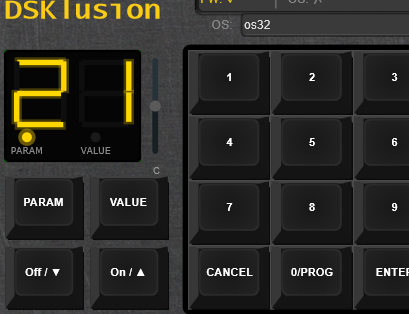
You love the Ensoniq Mirage. You love its gritty 8-bit samples, its crusty filter, its absolute refusal to sound polished. What you don't love is tracking down a 40-year-old floppy drive that still works.
Enter DSKlusion.
We didn't model the Mirage. We didn't vibe-check the Mirage. We literally ran the original firmware through a cycle-accurate emulation of every chip that made the hardware tick — the 6809 CPU, the 32-oscillator ES5503 DOC, the CEM3328 4-pole filter, the 6522, the 6850, the WD1772 floppy controller — the whole beautifully overcomplicated mess of it.
Load your original sample disks. Play your original sounds. Get the exact same audio you would have gotten in 1984, minus the hum, the dust, and the nervous breakdown when the drive head goes out of alignment.
And yes — we kept the UI. All of it. The cryptic two-digit display. The parameter pages that require a cheat sheet to navigate. The workflow that punishes curiosity. We didn't fix any of it (or did we?), because fixing it would mean it isn't a Mirage anymore. You wanted authentic? Congratulations.
Some plugins give you "that vintage feel."
DSKlusion gives you the vintage.
Changelog
v0.5.92 — September 16, 2026
- Running a second window no longer blanks or crops the first's UI. Each open editor now keeps its own private WebView data folder instead of one shared per product, so the standalone and the plugin — or two plugin instances in one project — can be open together on Windows without one coming up white or with its bottom cut off. Folders left behind by a closed instance are cleaned up automatically.
v0.5.91 — September 16, 2026
- Built on JUCE 9.0.2, up from 9.0.1.
v0.5.90 — September 16, 2026
- A User Library folder for your own disks. Settings → Sound has a new User Library row under Sound Disks. By default it is Documents\KnivesOnStrings\DSKlusion\User Library, and the disk browser creates it the first time it looks.
- The disk browser lists your User Library first, in its own group above your sound disks, subfolders included. A folder kept inside the other one is listed only once, and inserting a disk or restoring a backup finds it in whichever folder it came from.
v0.5.89 — September 15, 2026
- MASOS's Save Upper and Save Both are now tested on a booted MASOS disk, like Save Lower and Save Configuration before them. Each writes the right sound to the slot you choose, marks that slot as used on the disk, and changes nothing else.
v0.5.88 — September 15, 2026
- A write-protected disk now refuses saves, as a real write-protected floppy does: the Mirage shows Pd and the disk is left unchanged. Until now, marking a disk write-protected in the browser was only recorded; the emulated drive never saw it.
- Turning write protection on or off applies straight away to the disk in the drive. For any other disk it applies when that disk is mounted.
- Disks from the sound library come write-protected. If you have been saving to one, turn its write protection off in the disk browser first. Factory, OS and commercial disks ask you to confirm twice.
- Your own disks, which carry no write-protect mark, are writable, and the browser now shows them that way.
v0.5.87 — September 13, 2026
- Help text in Settings now has one typeface and colour in both products. Several of DSKlusion's rows (Boot ROM, OS disk images, sound disks, disk writes, audio and logging) had fallen back to a typewriter face.
- Folder and file rows share one design, and their Browse buttons match the other buttons in Settings.
- An empty folder or file row now reads "(default)" everywhere. Each of these settings falls back to a real default location, so "(not set)" was wrong.
v0.5.86 — September 13, 2026
- Choosing LLE without a boot ROM now tells you so. DSKlusion stays on HLEv2 and says what is missing: no boot ROM where Settings says to look, or a file there that is not one. Choose Boot ROM… picks the file and starts LLE from it; Use HLEv2 makes HLEv2 your engine.
- Starting with LLE saved but no boot ROM runs HLEv2 and shows the same notice, rather than a Mirage that never boots. LLE stays your saved engine, so it starts once a boot ROM is in place. A boot ROM copied into the default folder while DSKlusion is open is found the next time LLE is chosen.
- Choosing an unusable boot ROM file while LLE is running switches to HLEv2 with the same notice.
v0.5.85 — September 13, 2026
- Settings chosen in the standalone apps are kept. A folder chosen in the standalone Mample or DSKlusion (sound disks, OS disk images) could be gone the next time the app started, along with other settings changed in the same session: the app's own audio, MIDI and window state was saved over them. That state now has a file of its own,
Mample.standalone.settingsorDSKlusion.standalone.settings, and your audio device, MIDI inputs and window position carry over the first time the new version starts. A folder lost this way needs choosing once more. - Settings → Sound → Boot ROM sets the file LLE mode boots the Mirage from. It defaults to
Documents\KnivesOnStrings\DSKlusion\Firmware\mirage.bin, so a ROM placed there needs no setup; Browse picks a file anywhere else. - The row tells you whether it found a usable ROM there. A Mirage boot ROM is exactly 4,096 bytes, and a file of any other size is named as the problem.
- Choosing a boot ROM while LLE is running restarts the machine from it.
- HLEv2, the default engine, does not use the boot ROM and does not need one. The Engine Mode description now lists what LLE needs: the boot ROM and an OS disk.
v0.5.84 — September 12, 2026
- The About box's buttons led nowhere. Manual pointed at a page that did not exist, and GitHub at a private repository, so both failed for everyone who clicked them. Website and GitHub now open each product's own page and its public repository. The Manual button appears in Mample, which has a manual, and no longer appears in DSKlusion, which does not.
- Credits link to the projects behind them: JUCE, React, Tailwind CSS, Vite, the mc6809 CPU core, the HxC Floppy Emulator project, and each of the five typefaces. Links open in your web browser.
- The mc6809 CPU core is now credited to its author. It is elmerucr's MIT licensed MC6809. The About box and the Mample manual both named someone else.
- The HFE credit now credits the format. It read as though Virage used borrowed parsing code; Virage reads HFE disk images with its own code, and the format comes from the HxC Floppy Emulator project.
- The credit descriptions shortened in v0.5.83 are back in full. The About box scrolls when it needs to.
v0.5.83 — September 12, 2026
- Both products' About box now credits the fonts they ship. Inter, Noto Sans Symbols 2, Noto Sans Math, Courier Prime and IBM Plex Mono are all used under the SIL Open Font License 1.1, which asks that its notice travel with the software. Mample's manual has named them since v0.5.78, but DSKlusion has no manual, so until now it credited them nowhere.
- The About box said JUCE 8. The plugins are built on JUCE 9.
- The credits were tightened so the whole About box fits Mample's window without scrolling, with every name and author kept.
v0.5.79 — September 12, 2026
- Text is now set to a scale rather than to whatever looked about right. Between them the two products wrote 257 font sizes by hand. Mample used 14 different ones and DSKlusion 15, and on the main window each drew eight at once. The three doing nearly all the work sat within two pixels of each other, which is not a scale, and it is the reason nothing on either screen read as more important than anything else. There are now five steps, each named for the job it does, and a component asks for the job. Both windows render four of them plus the wordmark.
- The disk browser had a second, invisible scale. Nineteen of its sizes were set in half-pixels — 7.5, 8.5, 9.5, 10.5, 11.5 and 12.5 — alongside the whole-pixel ones. Those are gone.
- Nothing is clipped by the change. Every piece of text in both windows was measured against its box before and after, and none of it overflows.
- The product wordmarks keep their own sizes. They are a logo set in type, not a heading.
v0.5.70 — September 11, 2026
- The surface behind the page now matches the page. The editor's own fill and the web view's background colour were a light grey in both products, lighter than anything at the top of either window, so any seam between the web view and the window hosting it read as a pale line. Both now match the header.
v0.5.69 — September 8, 2026
- Opt-in telemetry and an in-plugin issue reporter, both compiled out by default. Ported from the shared plugin boilerplate as one library both products link. When a build enables them, anonymous session data is sent only after you have been asked once and said yes — never audio, never your samples, never anything that identifies you — and "Report an Issue…" in About opens a pre-filled form, or hands you a copyable URL if it cannot reach the server. Turned off in every build shipped so far.
v0.5.66 — September 7, 2026
- A bundled disk catalogue of 400+ disks. Mount a disk from the definitive archive and it is identified by name, OS, and what is actually on each half. Recognition is by content hash, not filename, so a disk still identifies correctly if it has been renamed, has no extension at all, or arrived as a Gotek-style numbered file.
.edmcontainer images load natively, and a file that genuinely is not a Mirage disk is reported as invalid instead of being loaded as garbage. - Disk metadata is editable. Wavesamples, key ranges and program names can all be edited against the full schema, and curation done locally can be harvested back into the shipped catalogue rather than living only on your machine.
- Disks in HFE and EDM containers boot in HLEv2 mode on both products, and a disk load now reaches sounds 2 and 3 instead of being hard-wired to lower/upper 1. The sample loop window is armed from the P63:P64 pair rather than the sample-end page, which is what the hardware does.
- The on-screen keyboard no longer misses note releases. Pointer capture was reworked; a key you slide off no longer sticks on.
- The keyboard is half its old height on both products, and the waveform panels are about 30% smaller, so more of the window is the thing you came for.
- You can save a disk back out to a file. Until now a mounted image was strictly read-only from your side: the firmware could write to it, but there was no way to keep the result. There is now a save gesture that writes the mounted image out to a real file, so a disk you have sampled to, renamed or re-parametered survives the session.
- It backs up before it overwrites, and it will not delete anything it did not create. Overwriting an existing image writes a backup alongside it first, and the backups are reachable rather than hidden somewhere you have to go looking. A destructive firmware write asks first.
- Write protection is honoured for real. The WD1772 controller reports the write-protect state and the firmware refuses the write itself, the way the hardware does — rather than the UI pretending the disk is locked while the emulation happily writes anyway.
- A floppy disk browser. Browse the catalogue, see what is on a disk before mounting it, and rename as you go — the rename flow advances by itself, and an "Unnamed" facet collects the disks still needing a name. The detail panel fits inside the plugin window rather than overflowing it.
- Your disk names are promoted into the shipped catalogue, so naming work done locally becomes part of the bundled data rather than being lost on reinstall.
- Parameters know which OS you booted. OS 3.2, MASOS and SP each have their own parameter definitions, and the parameter drawer reacts to whichever one is running — with live reads alongside the disk's own baseline, and cards that bold the values which differ from what the disk shipped with.
- RESET is a real power cycle — it reboots the mounted disk rather than half-resetting into an inconsistent state, and it waits for the drive to go genuinely quiet before swapping rather than trusting a fixed delay. A reboot glyph on the disk pill replaces the old header RESET button.
- A KEYS tab documenting the numpad-to-Mirage front-panel mapping, generated from the live binding map so it cannot drift from what the keys actually do. The numpad operators (
/ * + -) drive PARAM / VALUE / ON / OFF. - iPad layout. The UI scales to fit, the keyboard is sized for touch, and the parameters open in a drawer instead of a modal that ran off the bottom of the screen.
- The HLEv2 front panel's LOAD LOWER / LOAD UPPER plus a digit loads sounds 2 and 3 correctly.
- Front-panel polish: the CONTROL / SELECT / SEQ / LOAD / SAMPLE groups line up at matching heights, the keyboard and mod wheel no longer overlap, and the canvas is pinned to a true 4:3.
v0.4.6 – v0.4.12 — August 2026
- Disk browser rebuilt around how a real Mirage actually works: browse a scanned catalog, mount a disk (mounting just inserts it — nothing loads automatically), then use the classic front-panel LOAD LOWER / LOAD UPPER + digit + ENTER gesture to actually load a sound, with on-screen labels reconstructed honestly from the key sequence you type
- New in-app sound-disk browser with authentic per-slot LOAD, alongside the panel-driven workflow
- Settings → Appearance grew an OLED-blue display style option, a restyled onscreen keyboard, and a metal-grain chassis texture
- Accessibility pass — keyboard operability, visible focus states, and tab order fixed across the interface
- Loop-seam playback fixes: the Direct render path was dropping the host sample at the wavetable's marker tick, and one of three loop-mode code paths still ignored the sample's end-of-wavetable marker — both fixed. A DAW automation sweep during playback was also found to overwrite live sample data with zeros — fixed.
- Render Quality selector in Settings now actually changes engine behavior — it was previously cosmetic
- App icon rebuilt from the real logo, with a proper Windows/macOS/iOS icon pipeline
- macOS, Linux, and iOS build support brought up to parity with Windows; version numbering switched to a single tracked version file with an enforced bump-on-push check
Early August 2026 — front panel + hardware-accuracy fixes
- Traditional (non-Modern) front panel rebuilt to match an authentic Mirage hardware reference photo — bracket-grouped CONTROL / SELECT / SEQ / LOAD / SAMPLE clusters, with the waveform displays relocated below the panel
- Fixed a field-reported bug where sound-chip oscillators could be routed to the wrong output channel — now routed by the chip's own channel-assignment register field
- Fixed held notes cutting out unexpectedly at a sample's loop point (an oscillator "swap-partner" retrigger bug)
- Fixed a noise burst at the end of one-shot samples — a marker byte at the end of the wavetable should silence the oscillator, not play through as audio data
- Filter cutoff and resonance controls were wired backwards internally — now correct
- The emulated filter is now driven entirely by the running OS, removing a leftover override that could fight with the front-panel knobs
- Live disk swap — loading a new sound no longer reboots the emulated Mirage operating system
- Investigated a "LOAD button doesn't work" report — it turned out to be a test artifact, but the dig fixed real front-panel display glitches along the way (status flicker, waveform box sizing, markers, labels)
Late July 2026 — OS 3.2 conformance certification
- Ran the emulated OS 3.2 firmware through a full line-by-line pass against the original Musician's Manual — every documented front-panel, parameter, sequencer, and timing behavior verified against the real thing, closing every known gap
- Corrected the emulated hardware clock from a wrong rate to the authentic 2 MHz, fixing envelope and note timing across the board — some rates were previously several percent off the manual's own figures
- Removed the old native (non-WebView) editor entirely — the WebView-based interface is now the only UI
- Front panel keypad and LED display are now driven entirely by the emulated OS itself rather than a UI-side overlay — what's on the panel is what the real hardware would show
- Fixed MIDI notes played on the on-screen piano not reliably reaching whichever engine mode was active
June 2026 — full hardware emulation reaches audio
- Milestone: the cycle-accurate full hardware-emulation path now runs a complete boot → play a note → audio pipeline, tracking the fast-path emulation within ±20 cents
- Corrected the sound chip's internal register map and sample-address calculation against the datasheet and reference emulator sources, fixing a mis-decoded size field and a related timing bug
- Fixed sample playback to loop using each sample's actual loop points instead of always playing straight through once
- Fixed factory disk sample data being read incorrectly on the interleaved disk format — roughly 91% of sample bytes were wrong before this fix
- Fixed four separate hardware-emulation bugs that were preventing front-panel keypad presses from reaching the emulated OS
May 2026 — Modern panel mode
- New optional "Modern" panel view — a section-based redesign (Synthesis, Envelopes, Voice/Keyboard, Wavesample, MIDI/Mod) you can toggle to alongside the classic front panel
- Bank copy — copy a single parameter, a whole section, or an entire bank between banks A and B, with proper undo/redo
- Right-click context menu on Modern-panel controls
- Per-program data model — each bank now holds its 4 independent programs internally, with a program selector in the Modern view
- Wavesample section with hex-value sliders and draggable waveform markers for the per-wavesample parameters
May 2026 — pitch investigation + standards
- Structural HLE pitch fix — 22-round investigation into DOC SizeRes computation; frequency pipeline fully decoded and ported from ROM
- Real-time pitch-bend and HLE2 mod-wheel routing — wheels now modulate pitch and vibrato depth live in both HLE and HLE2 engine modes
- Shared RotaryKnob component — extracted from per-plugin knob implementations; uniform pointer capture, fine mode, and double-click reset across all plugins
- MIDI receive-channel filter wired
- Settings modal owns all audio and MIDI config; JUCE standalone options button hidden
- UI scale persisted in DAW project state
- 15 DAW-automatable parameter relays via useJuceParam hook
- WebUI CSS reset + CSS custom property tokens; KnoS plugin architecture and UI standards adopted
- Catch2 v3 test infrastructure; JS→C++ event dispatch table refactored
v0.3.98 — April 2026
- LLE MIDI fully working — complete MIDI-to-audio path: ACIA → FIRQ → OS dispatcher → DOC register programming → audio output
- HLE pitch fix — correct pitch across the full keyboard range (FreqTest passing)
- ROM-accurate LFO — triangle waveform, linear rate, exponential depth, P38 tracking fix
- FIFO voice stealing — voices stolen in order, matching hardware behaviour
- 3-DAC filter accuracy improvements
- Disk browser — browse and load from a built-in factory disk catalog without leaving the plugin
- macOS, iPadOS, CLAP build support added
- HLE2 clean-room OS — Modern GUI, sampling pipeline (Phases 1–4 complete)
- Sprint 5 ROM accuracy audit — 4 hardware-verified bugs fixed
v0.3 — March 25, 2026
- Product renamed from MirageV to DSKlusion — standalone is now DSKlusion.exe, app data moved to Documents/KnivesOnStrings/DSKlusion/
- Company renamed from FauxCoding to Knives on Strings (manufacturer code KnoS)
- WebView UI migration — new React/Vite/Tailwind editor with HeaderBar (undo/redo, settings, about, piano, CPU monitor, VU, volume), about and settings modals
- LLE MIDI pipeline — complete 5-step Low-Level Emulation path from MIDI input through ACIA → FIRQ → OS dispatcher → DOC register programming → audio capture
- LLE firmware boot — CPU now runs with 500x fast-forward until OS entry at $893C, all HLE defaults switched to LLE
- LLE audio diagnostics — voice lifecycle now producing 0.8s sound with decay
- Segment converter fix — all 16 ROM LED patterns now render correctly
- VIA fixes — CA1 edge polarity, keypad Port A read, base address corrected (ViaTest now 5/5)
- DOC control register reverted to Mirage bit layout (HALT=bit 7, IE=bit 4)
- Peripheral double-stepping removed, ACIA TX edge-trigger regression reverted
March 16, 2026 — LLE Boot Milestones
- ACIA TX interrupt edge-triggered — eliminates continuous FIRQ loop
- Cross-OS boot verification: OS 3.2, MASOS 2.0, Sound Process
- Identity segconv mapping + shared segment accumulation — display shows "21"
- Separate system RAM from sample RAM, restore 4-bank PB0+PB1 select
- DCF filter level/reso handlers, ACIA 6850 shift register fix
March 15, 2026 — LLE Reconciliation
- OS boots to $893C — LLE boot fully functional
- Major reverse-engineering update — architecture, reference docs, cross-OS analysis
- DOC register page mapping corrected
- VIA display latch filters, edge polarity fixes
- CEM3328 filter audit — register map swap (critical fix)
- FDC Write Sector implementation, correct step rate table
March 1–2, 2026 — Code Quality
- Anti-aliasing filter, DoubleBuffer concurrency tests, multi-rate DSP
- 4 critical audio thread safety issues resolved
- 8 important issues fixed from code review
February 2026 — Foundation
- DOC range, ACIA baud, DRQ routing (LLE prep)
- Lock-free DoubleBuffer, SpinLock replaced with AbstractFifo
- ZDF/TPT CEM3387 filter implementation
- Test suite consolidated: 24 files merged into 8
- HFE MFM decoding with LSB-to-MSB bit reversal